GridPACK Examples
This section will expand on the discussion of the power flow application and provide additional examples of how GridPACK can be used to develop applications. Two of these are simple, non-power grid applications that have been provided in GridPACK to illustrate how the code works, without necessarily getting involved in the details that would be needed to implement a realistic power grid model. The third example is an in-depth discussion of a simplified version of the contingency analysis application. This provides a good illustration of how to create multi-task simulations and also an example of how to use modules. A more complicated version of contingency analysis is available in the application area. The main difference between the two is that the contingency analysis simulation in the application area performs much more analysis on the results of the individual contingencies.
All the codes discussed here can be found under the top-level GridPACK
directory in src/applications/examples. The first of the simple
examples consists of a “hello world” program that writes a message from
a small \(10 \times 10\) square grid of buses and branches. The
second example calculates the electric current flow through a square
grid of resistors. Both examples are designed to show how the basic
features of the GridPACK framework interact with each other. More
realistic examples for power grid models can be found in the modules and
components directories under applications. Athough these examples
represent more complicated bus and branch models, they contain many of
the same characteristics that can be found in the hello world and
resistor grid programs.
The simplified contingency analysis example illustrates a great many of the advanced features of GridPACK in a fairly short code. These features include creating your own parser, using subcommunicators and the task manager, using modules and controlling output.
“Hello World”
The “Hello world” program is a famous example problem from C
programming. Many other packages have adopted the spirit of this
program, if not the specifics, to describe the simplest non-trivial
program that can be written using the package. In this section, a
program that prints out a message from each of the buses and branches on
a small grid is described. This application requires the user to define
branch and bus classes, create a network class and implement a top level
application. The source code for this example can be found in the
hello_world directory.
We start by implementing the load and serialWrite
methods in the BaseComponent class for the bus and branch
classes of our “Hello world” application. The bus and branch classes for
this application are called HWBus and HWBranch and have
the header file hw_components.hpp
#ifndef _hw_components_h_
#define _hw_components_h_

#include "boost/smart_ptr/shared_ptr.hpp"
#include "gridpack/include/gridpack.hpp"

namespace gridpack {
namespace hello_world {
class HWBus
  : public gridpack::component::BaseBusComponent {

  public:

    HWBus();  // Constructor
    ~HWBus()  // Destructor

    void load(const boost:shared_ptr
              <gridpack::component::DataCollection> &data);

    bool serialWrite(char *string, const int bufsize,
                     const char *signal = NULL);

  private:

    int p_original_idx;

    friend class boost::serialization::access;
    template<class Archive> void serialize(Archive &ar,
      const unsigned int version)
    {
      ar & boost::serialization::base_object
         <gridpack::component::BaseBusComponent>(*this)
         & p_original_idx;
    }
};

class HWBranch
  : public gridpack::component::BaseBranchComponent {

  public:

    HWBranch();   //Constructor
    ~HWBranch();  //Destructor

    void load(const boost::shared_ptr
          <gridpack::component::DataCollection> &data);

    bool serialWrite(char *string, const int bufsize,
                     const char *signal = NULL);

  private:

    int p_original_idx1;
    int p_original_idx2;

    friend class boost::serialization::access;
    template<class Archive> void serialize(Archive & ar,
      const unsigned int version)
    {
      ar & boost::serialization::base_object
         <gridpack::component::BaseBranchComponent>(*this)
         & p_original_idx1
         & p_original_idx2;
    }
};

typedef network::BaseNetwork<HWBus, HWBranch > HWNetwork;

}     // hello_world
}     // gridpack
#endif
The HWBus class has one private member, p_original_idx,
which is the index of the bus in the network configuration file.
Similarly, the HWBranch class has two private members,
p_original_idx1 and p_original_idx2, representing the
buses at the “from” and “to” ends of the branch. The first two lines of
the file are the standard preprocessor protection flags that guarantee
that any declarations in this file only appear in another file a single
time. The next two lines include the Boost smart pointer header file and
the header files from the GridPACK framework. The next two lines declare
that all functions and classes in the file are in the
gridpack::hello_world namespace. The use of namespaces is up to
the user and other choices are possible. The declaration of the
HWBus class inherits from the BaseBusComponent class so
all functions in the BaseBusComponent class are available to
HWBus. BaseBusComponent also provides some virtual
functions, along with their default implementations, that can be
overwritten in HWBus. Two of these are the load and
serialWrite functions. Only these functions are used in the
“Hello world” application, the remaining functions in the bases classes
are represented by the default implementations. Inside HWBus are
declarations for the constructor, destructor, load and
serialWrite functions. These will be implemented in the
hw_components.cpp file.
The final component in HWBus is the implementation of the
serialize method. This method is used when copying the class from one
processor to another and allows the program to move all the data
associated with a particular instance of HWBus to another
processor. The friend declaration means that
boost::serialization::access has access to protected methods and
data in HWBus and the templated serialization function is used
to declare all internal data members that need to be transferred with
the HWBus instance if it is moved from one processor to another.
These elements include whatever base class HWBus may be derived
from, which is represented by the element
boost::serialization::base_object<gridpack::component
     ::BaseBusComponent>(*this)
The remaining data element moved by the serialization method is
p_original_idx. The variable ar of type Archive
is appended using the operator &. In this case the data appended
to ar is any serialized data coming from the base class and the
variable p_original_idx. The serialization function is
recursive, so including the base class is enough to guarantee that any
variables beneath that are also included in the serialization.
The declaration for HWBranch is very similar. The only major
difference is that there are two private variables representing the
buses at either end of the branch and these must both be included in the
serialize function. The bottom of the file contains a typedef
declaration for a network using HWBus and HWBranch for it bus and branch
classes. This is a convenience and makes it easier to define other
functions and classes in the application.
The hw_components.cpp file contains the actual implementation of
the functions declared in hw_components.hpp. The declarations
for STL vectors and iostreams and the hw_components.hpp file are
included at the top of the file so that all functions in the class are
defined. For HWBus, the constructor and destructor are trivial
and are given by
gridpack::hello_world::HWBus::HWBus()}}}
{
  p_original_idx = 0;
}

gridpack::hello_world::HWBus::~HWBus()
{
}
The load function is more interesting and is designed to
transfer data that was read in from the network configuration file to
the internal parameters of the bus. In this case, there is only one
internal parameter, so load``\ is fairly simple. The bus ID
is stored in the variable ``BUS_NUMBER, so the load implemention
is
void gridpack::hello_world::HWBus::load(const
         boost::shared_ptr<gridpack::component::DataCollection> &data)
{
   data->getValue(BUS_NUMBER,&p_original_idx);}}}
}
All the parameters associated with the bus that came from the network
configuration file are stored in the data DataCollection object,
so the getValue statement is used to get the value from
data and assign it to p_original_index. A completely
listing of all variables that might be found in a DataCollection
object can be found in the dictionary.hpp file located in the
src/parser directory. The serialWrite function returns a
string with a message from the bus if called by some other program (in
this case an instance of SerialBusIO). For “Hello world”, the
bus reports back the bus index using the function
bool gridpack::hello_world::HWBus::serialWrite(char *string,
             const int bufsize, const char *signal)
{
   sprintf(string,"Hello world from bus %d\n",p_original_idx);
   return true;
}
For this case, both the incoming variables bufsize and
signal are ignored since “Hello world” only has one type of
output and it is guaranteed to fit in the buffer, but both variables
could be used in more complicated implementations. The bufsize
variable can be used to make sure that the string does not exceed an
internal buffer size and signal can by used to produce different
outputs depending on what the actual contents of signal are. For the
serialWrite implementations described for this application,
guaranteeing that the strings fit inside the buffer is straightforward,
since all strings are the same size. For real applications, this may not
be the case. For example, when printing out generator properties, the
strings from buses can vary in size because the number of generators on
a bus can vary. The implementations of the analogous functions in
HWBranch are similar. The constructor and destructor are
gridpack::hello_world::HWBranch::HWBranch(void)}}}
{
  p_original_idx1 = 0;
  p_original_idx2 = 0;
}

gridpack::hello_world::HWBranch::~HWBranch(void)
{
}
The load function is given by
void gridpack::hello_world::HWBranch::load(
        const boost::shared_ptr<gridpack::component::DataCollection> &data)
{
  data->getValue(BRANCH_FROMBUS,&p_original_idx1);
  data->getValue(BRANCH_TOBUS,&p_original_idx2);
}
This is similar to the implementation of the load function for
HWBus, except that the internal data members are mapped to the
values of the BRANCH_FROMBUS and BRANCH_TOBUS elements
of the data collection object. The serialWrite function is
bool gridpack::hello_world::HWBranch::serialWrite(char *string,
         const int bufsize, const char *signal)
{
  sprintf(string,
      "Hello world from the branch connecting bus %d to bus %d\n",
      p_original_idx1, p_original_idx2);
  return true;
}
Every branch prints out a string describing the branch in terms of the
bus IDs at each end of the branch. Again, the incoming bufsize and
signal variables are ignored in this case and it is assumed that the
buffer size assigned to the SerialBranchIO object when it is
instantiated is sufficiently large to guarantee that all strings from
every branch will fit.
The implementation of the factory class for the “Hello world” application is straightforward, since the class only needs the functionality in the BaseFactory class. The complete class is given by
#ifndef _hw_factory_h\_
#define _hw_factory_h_

#include "boost/smart_ptr/shared_ptr.hpp"
#include "gridpack/include/gridpack.hpp"
#include "hw_components.hpp"

namespace gridpack {
namespace hello_world {

class HWFactory
  : public gridpack::factory::BaseFactory<HWNetwork> {

  public:

    HWFactory(boost::shared_ptr<HWNetwork> network)
      : gridpack::factory::BaseFactory<HWNetwork>(network) {}

    ~HWFactory() {}

};
} // hello_world
} // gridpack

#endif
This class is defined in the hw_factory.hpp file. Because the
class is so simple, the complete class declaration is given in
hw_factory.hpp and there is no corresponding .cpp file.
In addition to including the gridpack.hpp header, this file also
includes hw_components.hpp, so it has the definitions of
HWNetwork. The HWFactory constructor is used to
initialize the underlying BaseFactory object with the network
that is passed in through the argument list. That is the only
functionality that is defined in this class.
The application class that is built on top of the component and factory classes consists of the class
#ifndef _hw_app_h_
#define _hw_app_h_

namespace gridpack {
namespace hello_world {

class HWApp
{
  public:

    HWApp(void);
    ~HWApp(void);
    void execute(int argc, char** argv);

};
} // hello_world
} // gridpack
#endif
This class is declared in hw_app.hpp. Apart from the constructor
and destructor, there is only the function execute, which is used to
actually run the program. This takes the standard argc and
argv variables as arguments, which could be passed in from the
top level calling program.
The implementation of these functions are relatively simple, most of the complexity for this program is in defining the bus and branch classes. The implementations are defined in the file hw_app.cpp
#include <iostream>
#include "boost/smart_ptr/shared_ptr.hpp"

#include "gridpack/include/gridpack.hpp"
#include "hw_app.hpp"
#include "hw_factory.hpp"

gridpack::hello_world::HWApp::HWApp(void)
{
}

gridpack::hello_world::HWApp::~HWApp(void)
{
}

void gridpack::hello_world::HWApp::execute(int argc, char** argv)
{
  gridpack::parallel::Communicator world;
  boost::shared_ptr<HWNetwork> network(new HWNetwork(world));

  std::string filename = "10x10.raw";

  gridpack::parser::PTI23_parser<HWNetwork> parser(network);

  parser.parse(filename.c_str());
  gridpack::hello_world::HWFactory factory(network);

  factory.load();

  gridpack::serial_io::SerialBusIO<HWNetwork> busIO(128,network);
  busIO.header("\nMessage from buses\n");
  busIO.write();

  gridpack::serial_io::SerialBranchIO<HWNetwork>
    branchIO(128,network);
  branchIO.header("\nMessage from branches\n");
  branchIO.write();}}}
}
The top of the file contains the gridpack.hpp header as well as
the application headers. The constructor and destructors for the
HWApp class are the standard defaults, so only the
execute function has any significant behavior. This function
starts by defining a communicator on the set of all processors and using
that to instantiate an instance of an HWNetwork. At this point
the network exists, but it contains no buses or branches. The next step
is to read in a network configuration file with the name
10x10.raw. This file is written using the standard PSS/E version
23 format. For this simple application, it is assumed that the file is
available in the directory in which the program is being run (this file
is included in the hello_world directory as part of the GridPACK
distribution). The program creates an instance of a PTI23_parser
and uses this to parse the configuration file. The program now has a
copy of the full network stored internally, but the buses and nodes are
not distributed in a way that is convenient for computation. Calling the
partition method on the network redistributes all buses and branches so
that each process has a relatively connected chunk of the network.
The next step is to create an HWFactory instance and use this to
call the base class load method. This method in turn calls the
load method on all the individual buses and branches and
transfers data from the data collection objects to the internal
parameters of the buses and branches. The data collection objects were
initialized with data collected from the 10x10.raw file when the
parse function was called. The remaining lines create
SerialBusIO and SerialBranchIO objects that are used to
print out the messages from individual bus and branch objects. The
busIO object is used to print out a header (“Message from
buses”) and then a message from each bus identifying itself by the bus
ID defined in the PSS/E file. Similarly, the branchIO obect
writes out a header and then a message from each branch identifying
itself by the IDs of the buses at either end. The final part of the
“Hello world” application is the main calling program, located in the
file hw_main.cpp. This program consists of the lines
#include "gridpack/include/gridpack.hpp"
#include "hw_app.hpp"

int main(int argc, char **argv)
{
  gridpack::parallel::Environment env(argc, argv);
  {
    gridpack::hello_world::HWApp app;
    app.execute(argc, argv);
  }

  return 0;
}
The program consists of a line creating a parallel environment, a line
instantiating an HWApp, and a line calling the execute method on
the application. The constructor for the parallel environment
initializes the underlying parallel communication libraries. The
destructor is called at the end of main and terminates all communication
libraries so that the program exits cleanly. The HWApp instance
runs the application when execute is called. A portion of the
output looks like
Message from buses
Hello world from bus 1
Hello world from bus 2
Hello world from bus 3
Hello world from bus 4
Hello world from bus 5
Hello world from bus 6
Hello world from bus 7
     :
Message from branches
Hello world from the branch connecting bus 1 to bus 2
Hello world from the branch connecting bus 2 to bus 3
Hello world from the branch connecting bus 3 to bus 4
Hello world from the branch connecting bus 4 to bus 5
Hello world from the branch connecting bus 5 to bus 6
    :
Note that this output would be the same, regardless of the number of processors that are used to run the code. This is in spite of the fact that the distribution of buses and branches may be different for different numbers of processors.
Resistor Grid Application
The resistor grid is a more complicated example that illustrates how GridPACK can be used to set up equations describing a physical system and then solve the system using a linear solver. The physical system is a rectangular grid with resistors connecting all the nodes. Two nodes are chosen to be set at fixed potentials, these then drive currents through the rest of the network resulting in different currents on the individual branches and different voltages on the different buses (nodes). The system is illustrated schematically in Figure 13.
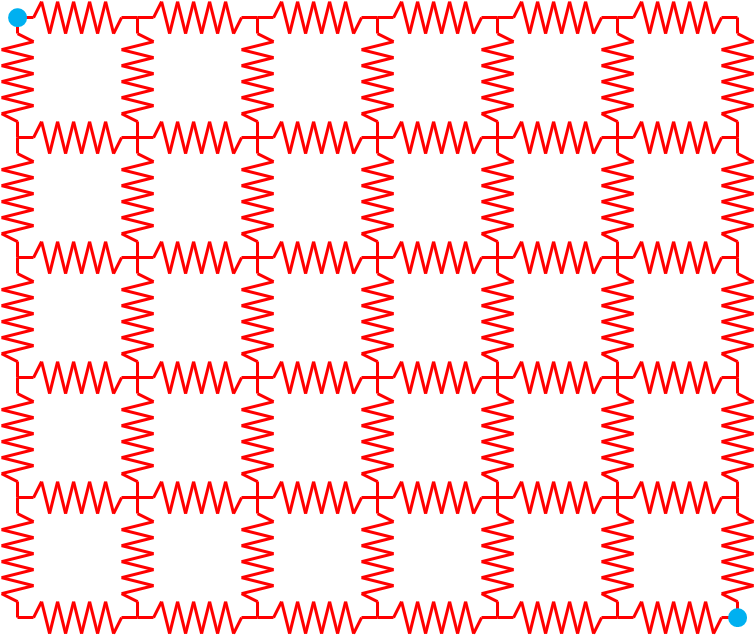
Figure 13: A schematic diagram of a simple resistor grid network. The buses (nodes) in blue are set at fixed external voltages, the remaining bus voltages and branch currents are calculated by the application.
The topology and choice of nodes held at fixed potential is determined by the network configuration file, as are the values of the resistance on each of the branches. The system is described by a set of coupled equations representing the application of Kirchhoff’s law to each of the nodes that is not held at a fixed potential. Kirchhoff’s law is expressed by the equations
where \(i_{\alpha \beta }\) is the current flowing between nodes \(\alpha\) and \(\beta\) and \(\left\{\alpha \right\}\) is the set of nodes connected directly to \(\alpha\). The current can be found from Ohm’s law
Where \(V_{\alpha }\) and \(V_{\beta }\) are the voltage potentials on nodes \(\alpha\) and \(\beta\) and \(R_{\alpha \beta }\) is the resistance on the branch connecting nodes \(\alpha\) and \(\beta\). Plugging the expression for the current back into Kirchhoff’s law gives the equation
The unknowns in this system are the potentials \(V_{\alpha }\). Kirchhoff’s law applies to any node that does not have an applied value of the potential. The nodes that do have a fixed potential appear as part of the right hand side vector. Assuming that any node with a non-fixed value of the potential is attached to at most one fixed node, then the \(\alpha\)th element of the right hand side vector is
where \(V^{\boldsymbol{0}}_{\boldsymbol{\beta }}\) is the value of the fixed potential on node \(\beta\) and \(\alpha\) is attached to \(\beta\). If \(\alpha\) is not attached to \(\beta\), then the element is zero. The voltages can be evaluated by solving the matrix equation
The voltage vector and right hand side have already been discussed. The matrix elements have the form
With this background, we can talk about the implementation of the resistor grid application.
Much of the basic structure of the classes has already been discussed in
the “Hello world” example in section 9.1, so we will
limit ourselves to discussing new features. The source code for this
example can be found in the resistor_grid directory. The
RGBus class inherits from the BaseBusComponent class and
implements the following functions (in addition to the constructor and
destructor)
void load(const boost::shared_ptr
  <gridpack::component::DataCollection> &data);
bool isLead() const;
double voltage() const;
bool matrixDiagSize(int *isize, int *jsize) const;
bool matrixDiagValues(ComplexType *values);
bool vectorSize(int *isize) const;
bool vectorValues(ComplexType *values);
void setValues(gridpack::ComplexType *values);
int getXCBufSize();
void setXCBuf();
bool serialWrite(char *string, const int bufsize,
  const char *signal = NULL);
In addition, the RGBus class has three private members
bool p_lead;
double *p_voltage;
double p_v;
The variable p_lead keeps track of whether a bus has a fixed
voltage applied to it. In order to correctly calculate the currents, it
is necessary to exchange voltages at the end of the calculation. The
voltages at each bus are stored in an exchange buffer that can be
accessed by the pointer p_voltage. The voltages in the external
PSS/E file are read in before the exchange buffer is allocated, so to
make sure there is a variable to store the value, the variable
p_v is also included as a private member. In addition to
implementing load and serialWrite, the RGBus
class implements several functions in the MatVecInterface, as
well as two functions, isLead() and voltage(), that are
unique to this class.
Similarly, the RGBranch class implements the functions
void load(const boost::shared_ptr
  <gridpack::component::DataCollection> &data);
double resistance(void) const;
bool matrixForwardSize(int *isize, int *jsize) const;
bool matrixReverseSize(int *isize, int *jsize) const;
bool matrixForwardValues(ComplexType *values);
bool matrixReverseValues(ComplexType *values);
bool serialWrite(char *string, const int bufsize,
  const char *signal = NULL);
and has the private member
double p_resistance;
The RGBus load method has the implementation
void gridpack::resistor_grid::RGBus::load(const
         boost::shared_ptr<gridpack::component::DataCollection> &data)
{
   int type;
   data->getValue(BUS_TYPE,&type);
   if (type == 2) {
     p_lead = true;
     data->getValue(BUS_BASEKV,&p_v);
   }
}
The PSS/E file that is used to run this application has been configured
so that the bus type parameter is set to 2 if the bus has a fixed
voltage and the value of the voltage is stored in the BUS_BASEKV
variable. The private member p_lead is initialized to false in
the RGBus constructor and p_v is initialized to zero. In
the load method, the bus type is assigned from the
BUS_TYPE variable in the data collection. If it is 2, the bus
has a fixed value of the potential and p_lead is set to true.
The value of p_v is assigned to whatever is stored in the
BUS_BASEKV variable when the bus type is 2. The contents of
p_v will eventually be mapped to p_voltage, once the
exchange buffers are allocated.
The load function for RGBranch simply assigns the data
collection variable BRANCH_R to the private member
p_resistance.
void gridpack::resistor_grid::RGBranch::load(
    const boost::shared_ptr
    <gridpack::component::DataCollection> &data)
{
  data->getValue(BRANCH_R,&p_resistance,0);
}
Once the bus and branch private members have been set using the load
methods, the values can be recovered by other objects using the
accessors isLead, voltage, and resistance. These
functions are used in the math interface implementations to calculate
values of the matrix elements and right hand side vectors and have the
relatively simple forms
bool gridpack::resistor_grid::RGBus::isLead() const
{
  return p_lead;
}

double gridpack::resistor_grid::RGBus::voltage() const
{
  return *p_voltage;
}

double gridpack::resistor_grid::RGBranch::resistance(void) const
{
  return p_resistance;
}
Note that the voltage function is returning the contents of
p_voltage, which will contain up-to-date values of the voltage
once the calculation begins.
The diagonal matrix block routines in the bus class have the implementations
bool gridpack::resistor_grid::RGBus::matrixDiagSize(int *isize,
   int *jsize) const
{
  if (!p_lead) {
    *isize = 1;
    *jsize = 1;
    return true;
  } else {
    return false;
  }
}

bool gridpack::resistor_grid::RGBus::matrixDiagValues(
   ComplexType *values)
{
  if (!p_lead) {
    gridpack::ComplexType ret(0.0,0.0);
    std::vector<shared_ptr<BaseComponent> > branches;
    getNeighborBranches(branches);
    int size = branches.size();
    int i;
    for (i=0; i<size; i++) {
      gridpack::resistor_grid::RGBranch *branch
        = dynamic_cast<gridpack::resistor_grid::RGBranch*>
          (branches[i].get());
      ret += 1.0/branch->resistance();
    }
    values[0] = ret;
    return true;
  } else {
    return false;
  }
}
The matrixDiagSize routine returns a single element in the
values array if the bus is not a lead with a fixed voltage,
otherwise it returns false and there are no values in the values
array. The matrixDiagValues function sets the first element of
the values array equal to the sum of the reciprocal of the
resistances on all the attached branches, if the bus is not a lead. To
calculate this quantity, it starts by calling the
getNeighborBranches function to get a list of pointers to
attached branches. These pointers are all of type BaseComponent,
so they need to be cast to pointers of type RGBranch before
functions like resistance can be called on them. This is done by
first calling the get function on the shared_ptr to the
BaseComponent object to get a bare pointer to the neighboring
branch and then doing a dynamic cast to a pointer of type
RGBranch. The resistance method can now by called on the
RGBranch pointer to get the resistance of the branch and use it
to calculate the contribution to the diagonal matrix element. This value
is assigned to values[0]. If the bus is a lead, then no values
are calculated and the function returns false. It is also worth noting
that this function will only be called on buses that are local to the
process, so each bus that evaluates a diagonal matrix element will have
a complete set of branches attached to it. This is not the case for
ghost buses. These have only one branch attached to them, no matter how
many branches are attached to it in the original network.
The off-diagonal elements are calculated by the branch components in the
functions matrixForwardSize, matrixReverseSize,
matrixForwardValues, and matrixReverseValues. The matrix
\(\overline{\overline{C}}\) for the resistor grid problem is
completely symmetric, so in this case, the forward and reverse
calculations are identical. For realistic power problems, this is not
generally true, and the forward and reverse functions will have
different implementations. The forward functions are described below,
the implementation of the reverse functions is identical. The branch
forward size and value functions are
bool gridpack::resistor_grid::RGBranch::matrixForwardSize(
   int *isize, int *jsize) const
{
  gridpack::resistor_grid::RGBus *bus1
    = dynamic_cast<gridpack::resistor_grid::RGBus*>(getBus1().get());
  gridpack::resistor_grid::RGBus *bus2
    = dynamic_cast<gridpack::resistor_grid::RGBus*>(getBus2().get());
  if (!bus1->isLead() && !bus2->isLead()) {
    *isize = 1;
    *jsize = 1;
    return true;
  } else {
    return false;
  }
}

bool gridpack::resistor_grid::RGBranch::matrixForwardValues(
   ComplexType *values)
{
  gridpack::resistor_grid::RGBus *bus1
    = dynamic_cast<gridpack::resistor_grid::RGBus*>(getBus1().get());
  gridpack::resistor_grid::RGBus *bus2
    = dynamic_cast<gridpack::resistor_grid::RGBus*>(getBus2().get());
  if (!bus1->isLead() && !bus2->isLead()) {
    values[0] = -1.0/p_resistance;
    return true;
  } else {
    return false;
  }
}
Before these functions can calculate return values, they must first
determine if one of the buses at either end of the branch is a lead bus.
To do this, the functions need to get pointers to the “from” and “to”
buses at either end of the branch. They can do this through the
getBus1 and getBus2 calls in the
BaseBranchComponent class which return pointers of type
BaseComponent. These pointers can then be converted to
RGBus pointers by a dynamic cast. The isLead functions
can be called to find out if either bus is a lead bus. If neither bus is
a lead bus, the size of the off-diagonal block is returned as a 1x1
matrix and the off-diagonal matrix element is calculated and returned in
values[0]. Otherwise both functions return false to indicate
that there is no contribution to the matrix from this branch.
In addition to calculating values of the matrix
\(\overline{\overline{C}}\), it is also necessary to set up the
right hand side vector. This is done via the functions
vectorSize and vectorValues defined on the buses. Only
buses that are not lead buses contribute to the right hand side vector.
On the other hand, the only non-zero values in the right hand side
vector come from non-lead buses that are attached to lead buses. The
vectorSize function has the implementation
bool gridpack::resistor_grid::RGBus::vectorSize(int *isize) const
{
  if (!p_lead) {
    *isize = 1;
    return true;
  } else {
    return false;
  }
}
If a bus is not a lead bus, it contributes a single value, otherwise it
does not and the function returns false. The vectorValues
function is a bit more complicated. It has the form
bool gridpack::resistor_grid::RGBus::vectorValues(ComplexType *values)
{
  if (!p_lead) {
    std::vector<boost::shared_ptr<BaseComponent> > branches;
    getNeighborBranches(branches);
    int size = branches.size();
    int i;
    gridpack::ComplexType ret(0.0,0.0);
    for (i=0; i<size; i++) {
      gridpack::resistor_grid::RGBranch *branch
        = dynamic_cast<gridpack::resistor_grid::RGBranch*>
          (branches[i].get());
      gridpack::resistor_grid::RGBus *bus1
        = dynamic_cast<gridpack::resistor_grid::RGBus*>
          (branch->getBus1().get());
      gridpack::resistor_grid::RGBus *bus2
        = dynamic_cast<gridpack::resistor_grid::RGBus*>
          (branch->getBus2().get());
      if (bus1 != this && bus1->isLead()) {
        ret += bus1->voltage()/branch->resistance();
      } else if (bus2 != this && bus2->isLead()) {
        ret += bus2->voltage()/branch->resistance();
      }
    }
    values[0] = ret;
    return true;

  } else {
    return false;
  }
}
The vectorValues function starts by getting a list of branches
that are attached to the calling bus and then looping over the list.
Pointers to each of the branches, as well as the buses at each end of
the branch are obtained using the getBus1 and getBus2
functions. It is still necessary to determine which end of the branch is
opposite the calling bus and this can be done by checking the conditions
bus1 != this and bus2 != this. One of these will be true
for the bus opposite the calling bus. If this bus is also a lead bus,
then a contribution is added to the right hand side vector element. The
contribution can be calculated by getting the value of the fixed voltage
from the lead bus and dividing it by the resistance of the branch. These
values can be obtained by calling the bus voltage function and
the branch resistance function. The *p_voltage value
of the calling bus is not used. If the calling bus is a lead bus, then
the function returns false.
The last function related to vectors that is implemented in the
MatVecInterface is the setValues function
void gridpack::resistor_grid::RGBus::setValues(
   gridpack::ComplexType *values)
{
  if (!p_lead) {
    *p_voltage = real(values[0]);
  }
}
Once the voltages have been calculated by solving Kirchhoff’s equations,
it is necessary to have some way of pushing these back on the buses so
they can be written to output. The results of the linear solver are
returned in the values array. The number of values in this array
corresponds to the number of values contributed to the right hand side
vector (in this case 1 if the bus is not a lead). Thus, the value is
assigned to the internal p_voltage variable if the bus is not a
lead bus. This function will be called by all buses as part of the
mapToBus function in the BusVectorMap. In order to
correctly calculate the current on all branches for export to standard
out, it is necessary to have up-to-date values of the voltage on all
buses, including ghost buses. This requires a data exchange at the end
of the calculation. To enable this exchange, the getXCBufSize
and setXCBuf functions must be implemented in the RGBus
class. These functions have the form
int gridpack::resistor_grid::RGBus::getXCBufSize()
{
  return sizeof(double);
}

void gridpack::resistor_grid::RGBus::setXCBuf(void *buf)
{
  p_voltage = static_cast<double*>(buf);
  *p_voltage = p_v;
}
The only variable that needs to be exchanged is the value of the
potential, so getXCBufSize returns the number of bytes in a
single double precision variable. The setXCBuf function assigns
the buffer pointed to by the variable buf to the internal data
member p_voltage. At the same time, it initializes the contents
of p_voltage to the variable p_v, which contains the
voltage read in from the external PSS/E file. The serialWrite
functions on the buses and branches are used to write the voltages and
currents on all buses and branches to standard output. The
serialWrite function on the buses has the form
bool gridpack::resistor_grid::RGBus::serialWrite(char *string,
    const int bufsize, const char *signal)
{
  if (p_lead) {
    sprintf(string,"Voltage on bus %d: %12.6f (lead)\n",
        getOriginalIndex(),*p_voltage);

  } else {
    sprintf(string,"Voltage on bus %d: %12.6f\n",
        getOriginalIndex(),*p_voltage);
  }
  return true;
}
All buses return a string so the function always returns true. The
printout consists of the bus index, obtained with the
getOriginalIndex function, and the value of the voltage on the
bus. Lead buses are marked in the output, indicating that the voltage is
the same as that specified in the input file, the remaining voltages are
calculated by solving Kirchhoff’s equations. For branches, the
serialWrite function is used to calculate and print the current flowing
across each branch
bool gridpack::resistor_grid::RGBranch::serialWrite(char *string,
    const int bufsize,  const char *signal)
{
  gridpack::resistor_grid::RGBus *bus1
    = dynamic_cast<gridpack::resistor_grid::RGBus*>(getBus1().get());
  gridpack::resistor_grid::RGBus *bus2
    = dynamic_cast<gridpack::resistor_grid::RGBus*>(getBus2().get());
  double v1 = bus1->voltage();
  double v2 = bus2->voltage();
  double icur = (v1 - v2)/p_resistance;
  sprintf(string,"Current on line from bus %d to %d is: %12.6f\n",
      bus1->getOriginalIndex(),bus2->getOriginalIndex(),icur);
  return true;
}
All branches report the current flowing through them, so this function also returns true for all branches. To calculate the current, it is necessary to get the value of the voltages at both ends of the branch using methods already described and then calculate the current by dividing the difference in voltages by the resistance of the branch. The print line prints the current and uniquely identifies each branch by including the IDs of the buses at either end.
The factory class for resistor grid application only uses functionality in the BaseFactory class and has the simple form
class RGFactory
  : public gridpack::factory::BaseFactory<RGNetwork> {
  public:
    RGFactory(boost::shared_ptr<RGNetwork> network)
      : gridpack::factory::BaseFactory<RGNetwork>(network) {}

    ~RGFactory() {}
};
Again, the BaseFactory class from which RGFactory
inherits is initialized by passing the network argument through the
constructor. The declaration for this class is in the file
rg_factory.hpp. There is no corresponding .cpp file.
The RGApp class declaration is also simple and consists of the
functions
class RGApp
{
  public:

    RGApp(void);
    ~RGApp(void);
    void execute(int argc, char** argv);
};
Again, arguments from the top level main program can be passed through
to the execute function, which is responsible for implementing
the actual resistor grid calculation. The RGApp class
declaration is contained in the rg_app.hpp file. The
implementation is contained in the rg_app.cpp file. The only
complicated function in the implementation is execute, which
consists of
void gridpack::resistor_grid::RGApp::execute(int argc, char** argv)
{
  // read configuration file
  gridpack::parallel::Communicator world;
  gridpack::utility::Configuration *config =
    gridpack::utility::Configuration::configuration();
  config->open("input.xml",world);
  gridpack::utility::Configuration::CursorPtr cursor;
  cursor = config->getCursor("Configuration.ResistorGrid");


  // create network and read in external PTI file
  // with network configuration
  boost::shared_ptr<RGNetwork> network(new RGNetwork(world));
  gridpack::parser::PTI23_parser<RGNetwor> parser(network);
  std::string filename;
  if (!cursor->get("networkConfiguration",&filename)) {
    filename = "small.raw";
  }
  parser.parse(filename.c_str());


  // partition network
  network->partition();

  // create factory and load parameters from input
  // file to network components
  gridpack::resistor_grid::RGFactory factory(network);
  factory.load();

  // set network components using factory and set up exchange
  // of voltages between buses
  factory.setComponents();
  factory.setExchange();
  network->initBusUpdate();

  // create mapper to generate voltage matrix
  gridpack::mapper::FullMatrixMap<RGNetwork> vMap(network);
  boost::shared_ptr<gridpack::math::Matrix> V = vMap.mapToMatrix();

  // create mapper to generate RHS vector
  gridpack::mapper::BusVectorMap<RGNetwork> rMap(network);
  boost::shared_ptr<gridpack::math::Vector> R = rMap.mapToVector();

  // create solution vector by cloning R
  boost::shared_ptr<gridpack::math::Vector> X(R->clone());

  // create linear solver and solve equations
  gridpack::math::LinearSolver solver(*V);
  solver.configure(cursor);
  solver.solve(*R, *X);

  // push solution back on to buses
  rMap.mapToBus(X);

  // exchange voltages so that all buses have correct values. This
  // guarantees that current calculations on each branch are correct
  network->updateBuses();

  // create serial IO objects to export data
  gridpack::serial_io::SerialBusIO<RGNetwork> busIO(128,network);
  char ioBuf[128];
  busIO.header("\nVoltages on buses\n\n");
  busIO.write();

  gridpack::serial_io::SerialBranchIO<RGNetwork>
    branchIO(128,network);
  branchIO.header("\nCurrent on branches\n\n");
  branchIO.write();
}
The beginning of the resistor grid application is more complicated than
“Hello world” in that it uses an input file to control the properties of
the linear solver that is used to solve current equations. To read in
the input file, the application starts by creating a communicator on the
set of all processors. Only one configuration object is available to the
application and the execute function gets a pointer to this
instance by calling the static function
Configuration::configuration(). This pointer can then be used to
read in the input file, “input.xml”, across all processes in the
communicator world using the open method. All processors
now have access to the contents of input.xml. The input file
contains two pieces of information, the name of the PSS/E-formatted
resistor grid configuration file and the parameters for the linear
solver. The input file has the form
<?xml version="1.0" encoding="utf-8"?>
<Configuration>
  <ResistorGrid>
    <networkConfiguration> small.raw </networkConfiguration>
    <LinearSolver>
      <PETScOptions>
        -ksp_view
        -ksp_type richardson
        -pc_type lu
        -pc_factor_mat_solver_package superlu_dist
        -ksp_max_it 1
      </PETScOptions>
    </LinearSolver>
  </ResistorGrid>
</Configuration>
The resistor grid file name can be obtained by getting a
CursorPtr that is pointed at the ResistorGrid block in
the input file by using the getCursor function and then using
the get function to retrieve the actual file name located in the
networkConfiguration``\ field. If no file is specified in
the input deck, the file name defaults to “``small.raw”. At the
same time, an RGNetwork object is instantiated and used to
initialize an instance of PTI23_parser. This can then read in
the resistor grid configuration file using the parse function.
At this point, all buses and branches have been created, but they may
not be distributed in a way that supports computation. The network
partition function is called to redistribute the network so that
each process has maximal connections between components located on the
process and minimal connections to components located on other
processes. The ghost buses and branches are also added by the
partition function.
After partitioning, an RGFactory object is created and the base
class load method is called to initialize the internal data
elements on each bus and branch in the network. This function
initializes both locally held components as well as ghost components, so
there is no need for a data exchange to guarantee that all components
are up to date. The factory also calls the base class
setComponents method, which determines several types of internal
indices that are used to set up calculations. The buffers needed to
exchange data at the end of the calculation are set up by a call to the
factory setExchange method. Additional internal data structures
needed for the data exchange between buses are created by calling the
network initBusUpdate method. No data exchanges are needed
between branch components.
The next step in the algorithm is to create the matrix
\(\overline{\overline{C}}\), the right hand side vector and a vector
to contain the solution. Two separate mappers are needed, one for the
matrix \(\overline{\overline{C}}\) and the other for the right hand
side vector. For the matrix, the code creates an instance of a
FullMatrixMap that is initialized with the resistor grid
network. The mapToMatrix function is called to create the matrix
V. The right hand side vector is created by creating instance of
a BusVectorMap and using the mapToVector function to
create the vector R. The solution vector X does not need
to be initialized to any particular value, it just needs to be the same
size as R so it is created by having R call the
clone method in the Vector class and using the result to
initialize X.
Once V, R, and X are available, the equations
can be solved using a linear solver. The linear solver is created by
initializing an instance of LinearSolver with the matrix
V. The solver class configure method can be used to
transfer solver parameters in the LinearSolver``\ block in
``input.xml to the solver. The cursor pointer that is
taken as an argument to configure is already pointing to the
ResistorGrid block in the input file, so configure will
pick up any parameters in a LinearSolver block within the
ResistorGrid block. After configuring the solver, the solution
vector can be obtained by calling the solve method and the
resulting voltages are pushed back to buses using the mapToBus
method in the BusVectorMap class.
After calling mapToBus, all locally held buses have correct
values of the voltage, but ghost buses still have their initial values.
To correct the voltages on ghost buses, it is necessary to call the
network updateBuses function. The buffer p_voltage now
contains correct values of the voltage on all buses.
The only remaining step is to write the results to standard output. The
voltages are written by creating an instance of SerialBusIO. The
maximum buffer size is set to 128 characters, which is enough to hold
any lines of output coming from the buses. A header labeling the bus
output is written to standard out using the header method and
then bus voltages are written by calling write. Similarly,
output from the branches can be written by creating an instance of
SerialBranchIO, writing a header using the
header method and then calling write. Since only
one type of output comes from the branches and buses, no character
string is passed in as an argument to the write functions. The
execute function has now completed all tasks associated with
solving the resistor grid problem and passes control back to the main
calling program.
The main calling program is relatively simple and consists of the code
int main(int argc, char **argv)
{
  gridpack::parallel::Environment env(argc, argv);
  {
    gridpack::resistor_grid::RGApp app;
    app.execute(argc, argv);
  }
  return 0;
}
The parallel computing environment is set up by creating an instance of
Environment. The computing environment is also cleaned up at the
end of the calculation when the destructor for this object is called.
The math libraries are initialized Environment constructor and
cleaned up at the end of the calculation by a call to
thelEnvironment destructor. The only remaining calls are to
create an instance of an RGApp and call its execute
method. The extra brackets around the resistor_grid instance
guarantees that the destructor for resistor_grid is called
before the destructor for Environment. This ensures that any
data structure in the application are cleaned up before the parallel
environment is shut down.
A portion of the output from the resistor grid calculation is shown below
GridPACK math module configured on 8 processors
    :
Voltages on buses

Voltage on bus 1:     1.000000 (lead)
Voltage on bus 2:     0.667958
Voltage on bus 3:     0.467469
Voltage on bus 4:     0.329598
Voltage on bus 5:     0.227289
Voltage on bus 6:     0.148733
Voltage on bus 7:     0.088491
    :
Current on branches

Current on line from bus 1 to 2 is:    20.000000
Current on line from bus 2 to 3 is:     4.009776
Current on line from bus 3 to 4 is:     2.757436
Current on line from bus 4 to 5 is:     2.046167
Current on line from bus 5 to 6 is:     4.545785
    :
The first line is written by the call to the math library
Initialize function and reports on the number of processors
being used in the calculation. This information is useful in keeping
track of the performance characteristics of different calculations. Some
information from the solvers is usually printed after this. At the end
of the calculation, the values of the voltages on the buses are printed
out and then the current on each of the branches. The buses with
externally applied voltages are identified with keywork ”lead”.
Contingency Analysis
An example contingency application has been included in the contingency
analysis directory. This contingency analysis is simpler than the one
available under the applications directory and provides a
relatively compact demonstration of some of the advanced features of
GridPACK. This application is built entirely around the power flow
module, so it has no network component classes of its own. The main
functionality is located in the CADriver class that consists of
two methods (other than the constructor and destructor). One function is
used to read in a list of contingencies and convert them to a
corresponding Contingency data structure and the other function
executes the contingency analysis calculation. These two functions will
be discussed in detail.
The function for reading in the contingencies and converting them to a list of Contingency data structures has the calling signature
std::vector<gridpack::powerflow::Contingency> getContingencies(

  gridpack::utility::Configuration::ChildCursors contingencies)
The Contingency data structures are defined as part of the power
flow module and exist in the gridpack::powerflow namespace. The
list of cursors represented by the contingencies variable is obtained by
the calling program before calling this function. The function itself is
std::vector<gridpack::powerflow::Contingency> ret;
int size = contingencies.size();
int i, idx;
gridpack::utility::StringUtils utils;
for (idx = 0; idx < size; idx++) {
  std::string ca_type;
  contingencies[idx]->get("contingencyType",&ca_type);
  std::string ca_name;
  contingencies[idx]->get("contingencyName",&ca_name);
  if (ca_type == "Line") {
    std::string buses;
    contingencies[idx]->get("contingencyLineBuses",&buses);
    std::string names;
    contingencies[idx]->get("contingencyLineNames",&names);
    std::vector<std::string> string_vec =
        utils.blankTokenizer(buses);
    std::vector<int> bus_ids;
    for (i=0; i<string_vec.size(); i++) {
      bus_ids.push_back(atoi(string_vec[i].c_str()));
    }
    string_vec.clear();
    string_vec = utils.blankTokenizer(names);
    std::vector<std::string> line_names;
    for (i=0; i<string_vec.size(); i++) {
      line_names.push_back(utils.clean2Char(string_vec[i]));
    }
    if (bus_ids.size() == 2*line_names.size()) {
      gridpack::powerflow::Contingency contingency;
      contingency.p_name = ca_name;
      contingency.p_type = Branch;
      int i;
      for (i = 0; i < line_names.size(); i++) {
        contingency.p_from.push_back(bus_ids[2*i]);
        contingency.p_to.push_back(bus_ids[2*i+1]);
        contingency.p_ckt.push_back(line_names[i]);
        contingency.p_saveLineStatus.push_back(true);
      }
      ret.push_back(contingency);
    }
  }se if (ca_type == "Generator") {
    std::string buses;
    contingencies[idx]->get("contingencyBuses",&buses);
    std::string gens;
    contingencies[idx]->get("contingencyGenerators",&gens);
    std::vector<std::string> string_vec =
        utils.blankTokenizer(buses);
    std::vector<int> bus_ids;
    for (i=0; i<string_vec.size(); i++) {
      bus_ids.push_back(atoi(string_vec[i].c_str()));
    }
    string_vec.clear();
    string_vec = utils.blankTokenizer(gens);
    std::vector<std::string> gen_ids;
    for (i=0; i<string_vec.size(); i++) {
      gen_ids.push_back(utils.clean2Char(string_vec[i]));
    }
    if (bus_ids.size() == gen_ids.size()) {
      gridpack::powerflow::Contingency contingency;
      contingency.p_name = ca_name;
      contingency.p_type = Generator;
      int i;
      for (i = 0; i < bus_ids.size(); i++) {
        contingency.p_busid.push_back(bus_ids[i]);
        contingency.p_genid.push_back(gen_ids[i]);
        contingency.p_saveGenStatus.push_back(true);
      }
      ret.push_back(contingency);
    }
  }
}
return ret;
This function is designed to parse input of the form
<?xml version="1.0" encoding="utf-8"?>
<ContingencyList>
  <Contingency\_analysis>
    <Contingencies>
      <Contingency>
        <contingencyType>Line</contingencyType>
        <contingencyName>CTG1</contingencyName>
        <contingencyLineBuses> 13 14</contingencyLineBuses>
        <contingencyLineNames> B1 </contingencyLineNames>
      </Contingency>
      <Contingency>
        <contingencyType>Generator</contingencyType>
        <contingencyName>CTG2</contingencyName>
        <contingencyBuses> 2  </contingencyBuses>
        <contingencyGenerators>1 </contingencyGenerators>
      </Contingency>
    </Contingencies>
  </Contingency\_analysis>
</ContingencyList>
The contingencies list in the argument consists of a vector of
Configuration module cursors, each of which is pointing to one
of the Contingency blocks in this input.
The first few lines in the getContingencies function are used to
create the return list, determine the number of contingencies in the
ChildCursors list and create a StringUtils object that
can be used to parse the input. The function then loops over all cursors
in the contingencies list. All contingencies should contain the
contingencyType and contingencyName field, so these
values are obtained using the get function from the
Configuration module. The type can be either “Line” or
Generator. Based on the type, the function bifurcates into two
branches. The “Line” branch looks for the strings corresponding
to contingencyLineBuses and contingencyLineNames and
assigns these to the string variables buses and names.
More than one transmission element may be involved in the contingency.
The StringUtils blankTokenizer function is used to parse
the buses string into a list of strings that can then be
converted to a list of integers. These represent the original indices of
the buses at each end of the branch. The names string is also
converted to a list representing the two character tag identifying the
individual transmission element between the two buses. This is then
reformatted to a consistent 2-character format using the
StringUtils clean2Char function. The string vector
string_vec is used to hold the results from
blankTokenizer, and the final list of integers and character
tags are stored in the variables bus_ids and line_names.
Each transmission element is characterized by two buses and a character
tag, so the number of bus IDs should be twice the number of tags. If
this condition is met, then the contingency is assumed to be well formed
and a Contingency struct is created for it. After copying the
data stored in the variables ca_type, ca_name,
bus_ids and line_names, this contingency is added to the
return variable ret.
The Generator branch is similar to the “Line” branch. The
strings in the contingencyBuses and
contingencyGenerators fields are copied into the string
variables buses and gens. These are then converted into
a list of bus IDs and generator tags using the blankTokenizer function
and stored in the list bus_ids and gen_ids. A generator
is characterized by the original index of the bus that it is associated
with and the 2-character generator tag so the size of the
bus_ids and gen_ids vectors must be equal. If this
condition is met, then a Contingency struct is created, the
contingency data is copied to it and the struct is added to the return
variable ret.
After all cursor in contingencies have been processed, the
getContingencies function returns a list of Contingency
structs representing all the contingencies in the original XML input
file.
The execute function actually runs the simulation and starts
with the code block
void gridpack::contingency_analysis::CADriver::execute(int argc, char** argv)
{
  gridpack::parallel::Communicator world;
  gridpack::utility::CoarseTimer *timer =
    gridpack::utility::CoarseTimer::instance();
  int t_total = timer->createCategory("Total Application");
  timer->start(t_total);

  gridpack::utility::Configuration *config
    = gridpack::utility::Configuration::configuration();
  if (argc >= 2 && argv[1] != NULL) {
    char inputfile[256];
    sprintf(inputfile,"%s",argv[1]);
    config->open(inputfile,world);
  } else {
    config->open("input.xml",world);
  }
}
The user can pass in the name of the input file when they invoke the
contingency analysis application, and this is transmitted via the
variables argc and argv in the argument list. If an
argument is detected, then the code will try and open a file using the
argument as the filename, otherwise it will assume the input file is
called “input.xml”. Once the input file is open, all processors
have access to its contents. This section also creates a timing category
for the calculation and starts the timer. The call to
CoarseTime::instance returns the timer object and the
createCategory call creates a timer category with the name
Total Application. It also returns a handle to this category.
The start call begins the timer. The timer can be started and
stopped multiple times for the same category.
The next few lines are used to parse the input file and determine the size of the communicators that should be used to run individual tasks.
gridpack::utility::Configuration::CursorPtr cursor;
cursor = config->getCursor("Configuration.Contingency_analysis");
int grp_size;
double Vmin, Vmax;
if (!cursor->get("groupSize",&grp_size)) {
  grp_size = 1;
}
if (!cursor->get("minVoltage",&Vmin)) {
  Vmin = 0.9;
}
if (!cursor->get("maxVoltage",&Vmax)) {
  Vmax = 1.1;
}
gridpack::parallel::Communicator task_comm = world.divide(grp_size);
A CursorPtr is defined and set to point to the contents of the
Contingency_analysis block in the input file using the
getCursor function. This block contains parameters defining some
of the properties of the simulation. The groupSize parameter
sets the size of the communicator on which individual power flow
calculations are run. The power flow is not very scalable in GridPACK
and it is usually fastest to run it on one processor, so the default
value is 1. The minVoltage and maxVoltage parameters are
the limits, in p.u., for acceptable voltage variations on individual
buses. Once the group size has been set, the world communicator is
divided into subcommunicators using the divide function. This guarantees
that each subcommunicator contains at most the number of processes
specified using groupSize (one subcommunicator may contain less
than this number). Each process is now part of both the world
communicator and one subcommunicator.
The next block of code creates a power flow application on each task communicator and initializes it.
boost::shared_ptr<gridpack::powerflow::PFNetwork>
    pf_network(new gridpack::powerflow::PFNetwork(task_comm));
gridpack::powerflow::PFAppModule pf_app;
pf_app.readNetwork(pf_network,config);
pf_app.initialize();
pf_app.solve();
pf_app.ignoreVoltageViolations(Vmin,Vmax);
The first line creates a power flow network on the task communicator.
The second line creates a power flow application. The
readNetwork function assigns the powerflow network (which
currently has nothing in it) to the power flow application, along with
the pointer to the configuration module. The input file is expected to
have a Powerflow block that contains parameters for the power
flow application. These include the location of the network
configuration file and the type of solver that is to be used. An example
of a complete input file is
<?xml version="1.0" encoding="utf-8"?>
<Configuration>
  <Contingency\_analysis>
    <contingencyList>contingencies.xml</contingencyList>
    <groupSize>2</groupSize>
    <maxVoltage>1.1</maxVoltage>
    <minVoltage>0.9</minVoltage>
  </Contingency\_analysis>
  <Powerflow>
    <networkConfiguration> IEEE14\_ca.raw </networkConfiguration>
    <maxIteration>50</maxIteration>
    <tolerance>1.0e-6</tolerance>
    <LinearSolver>
      <PETScOptions>
        -ksp\_type richardson
        -pc\_type lu
        -pc\_factor\_mat\_solver\_package superlu\_dist
        -ksp\_max\_it 1
      </PETScOptions>
    </LinearSolver>
  </Powerflow>
</Configuration>
Note that it has two blocks, Contingency_analysis and
Powerflow. The parameters describing the contingency calculation
and the location of the contingencies are located in the first block and
the power flow parameters are located in the second block. The
readNetwork function will read in the network configuration file
and partition the network. The initialize function is used to
initialize the network components from the DataCollection
objects and assign exchange buffers. The call to solve is used
to obtain a power solution to the base problem with no contingencies.
Since all tasks have the same data at this point, the network solution
is duplicated across all subcommunicators. This duplication is faster
than solving the base case powerflow on one processor and then
broadcasting the result across the system. The final call to
ignoreVoltageViolations sets a parameter in each network
component that violates the voltage bounds for base case. These
components will be ignored in any subsequent checks for voltage
violations. This call is used to prevent all contingencies from
reporting a violation.
The next step is to read in the contingencies and convert these to a list of contingency data structs.
std::string contingencyfile;
if (!cursor->get("contingencyList",&contingencyfile)) {
  contingencyfile = "contingencies.xml";
}
bool ok = config->open(contingencyfile,world);
cursor = config->getCursor(
    "ContingencyList.Contingency_analysis.Contingencies");
gridpack::utility::Configuration::ChildCursors contingencies;
if (cursor) cursor->children(contingencies);
std::vector<gridpack::powerflow::Contingency>
  events = getContingencies(contingencies);
if (world.rank() == 0) {
  int idx;
  for (idx = 0; idx < events.size(); idx++) {
    printf("Name: %s\n",events[idx].p_name.c_str());
    if (events[idx].p_type == Branch) {
      int nlines = events[idx].p_from.size();
      int j;
      for (j=0; j<nlines; j++) {
        printf(" Line: (from) %d (to) %d (line) \'%s\'\n",
            events[idx].p_from[j],events[idx].p_to[j],
            events[idx].p_ckt[j].c_str());
      }
    } else if (events[idx].p_type == Generator) {
      int nbus = events[idx].p_busid.size();
      int j;
      for (j=0; j<nbus; j++) {
        printf(" Generator: (bus) %d (generator ID) \'%s\'\n",
            events[idx].p_busid[j],events[idx].p_genid[j].c_str());
      }
    }
  }
}
The location of the contingency file is contained in the
contingencyList field in the input file. If this field is not
present, the code defaults to the file name contingencies.xml.
The contintency file is then opened using the open function in
the Configuration module and a cursor is set to the
Contingencies block within this file. The
Configuration::children function returns a list of cursor
pointers that point to each of the individual Contingency
blocks. The getContingencies function described above parses
each of these blocks and returns a vector of contingency data structs.
The contingency list is replicated on all processors. Process 0 is used
to provide a listing of the contingencies to standard output by looping
over the events vector returned by the getContingencies
function.
Once the contingencies have been determined, the code next sets up a task manager on the world communicator and sets the number of tasks equal to the number of contingencies.
gridpack::parallel::TaskManager taskmgr(world);
int ntasks = events.size();
taskmgr.set(ntasks);
The task loop is created by defining a task_id variable and a
character string buffer that is used inside the loop to create messages.
The task manager then begins iterating over different tasks.
int task_id;
char sbuf[128];
while (taskmgr.nextTask(task_comm, &task_id)) {
  printf("Executing task %d on process %d\n",task_id,world.rank());
                    :
The call to nextTask takes the task communicator as one of its
arguments so the value of task_id that is returned is the same
for all processors on the task communicator. This guarantees that each
of the processors in this copy of the power flow applicatin is working
on the same contingency. If the nextTask function returns false,
the tasks have been completed and the code exits from the while
loop. At the start of the task, the code prints out a statement to
standard out describing which tasks are being executed by each
processor.
The next few lines in the task loop are used to open a file so that the output from each task is directed to a separate file. This can be used later to examine individual tasks.
sprintf(sbuf,"%s.out",events[task_id].p_name.c_str());
pf_app.open(sbuf);
sprintf(sbuf,"\nRunning task on %d processes\n",task_comm.size());
pf_app.writeHeader(sbuf);
if (events[task_id].p_type == Branch) {
  int nlines = events[task_id].p_from.size();
  int j;
  for (j=0; j<nlines; j++) {
    sprintf(sbuf," Line: (from) %d (to) %d (line) \'%s\'\n",
        events[task_id].p_from[j],events[task_id].p_to[j],
        events[task_id].p_ckt[j].c_str());
  }
} else if (events[task_id].p_type == Generator) {
  int nbus = events[task_id].p_busid.size();
  int j;
  for (j=0; j<nbus; j++) {
    sprintf(sbuf," Generator: (bus) %d (generator ID) \'\%s\'\n",
    events[task_id].p_busid[j],
    events[task_id].p_genid[j].c_str());
  }
}
pf_app.writeHeader(sbuf);
The first line is used to create a name for the output file using the
contingency name. The output from the power flow calculation is then
redirected to this file using the power flow open function.
Next, some information about this particular contingency is written to
the file using some calls to the writeHeader method. This
includes the number of processors used to calculate the contingency and
the details of the contingency itself.
The remaining lines in the while loop are used to solve the power flow equations.
  pf_app.resetVoltages();
  pf_app.setContingency(events[task_id]);
  if (pf_app.solve()) {
    pf_app.write();
    bool ok = pf_app.checkVoltageViolations(Vmin,Vmax);
    ok = ok && pf_app.checkLineOverloadViolations();
    if (ok) {
      sprintf(sbuf,"\nNo violation for contingency %s\n",
          events[task_id].p_name.c_str());
    } else {
      sprintf(sbuf,"\nViolation for contingency %s\n",
          events[task_id].p_name.c_str());
    }
    pf_app.print(sbuf);
  }
  pf_app.unSetContingency(events[task_id]);
  pf_app.close();
}
Before doing the calculation, all voltages are returned to the original
values defined in the network configuration file using
resetVoltages. The contingency parameters are set to the values
specified by the task_id element in the events list
using the setContingency method.
The system is then solved using the power flow solve function.
If the solution succeeds, the calculation writes out the voltages and
branch power flow values to the outpuf file. The calculation also checks
for voltage violations and line overload violations. The results of
these checks are written to the output file for each power flow
calculation. After this is complete, the powerflow calculation returns
all contingency related parameters to their original values using
unSetContingency and closes the output file. This is repeated
until all contingencies in the event list have been evaluated.
At this point, the contingency application is essentially complete. The remaining lines of code
taskmgr.printStats();
timer->stop(t_total);
if (events.size()*grp_size >= world.size()) {
  timer->dump();
}
are used to print out a list of how many tasks were evaluated on each
processor and to stop the timing of the “Total Application”
category. The timer dump method will print statistics on the
amount of time spent in the total application as well as reporting
timings inside the power flow application. The check on the dump
call is to verify that all processors have participated in at least one
power flow calculation. If this condition is not met, then the timing
statistics will not be valid (note that if this condition is not
fulfilled, then it indicates that too many processors were requested for
the calculation).